I Gave My Security Cameras One Job: Only Bother Me When It Matters
Frigate was already good at detecting objects. I wanted the rest of the system to answer a more useful question:do I actually need to know about this?
Detection was not the problem. Useful notifications were.
I already had camera recording handled by Synology Surveillance Station. I was not trying to replace the recorder. Frigate's job was object detection.
The problem was what happened after a detection. A person walks past. A car moves. A camera sees something technically correct but completely unimportant. Traditional automation logic is very good at saying an event happened. It is much worse at deciding whether I care.
I did not need my cameras to get better at seeing things. I needed the notification system to get better at leaving me alone.
The recorder stayed the recorder. I added a smarter decision layer.
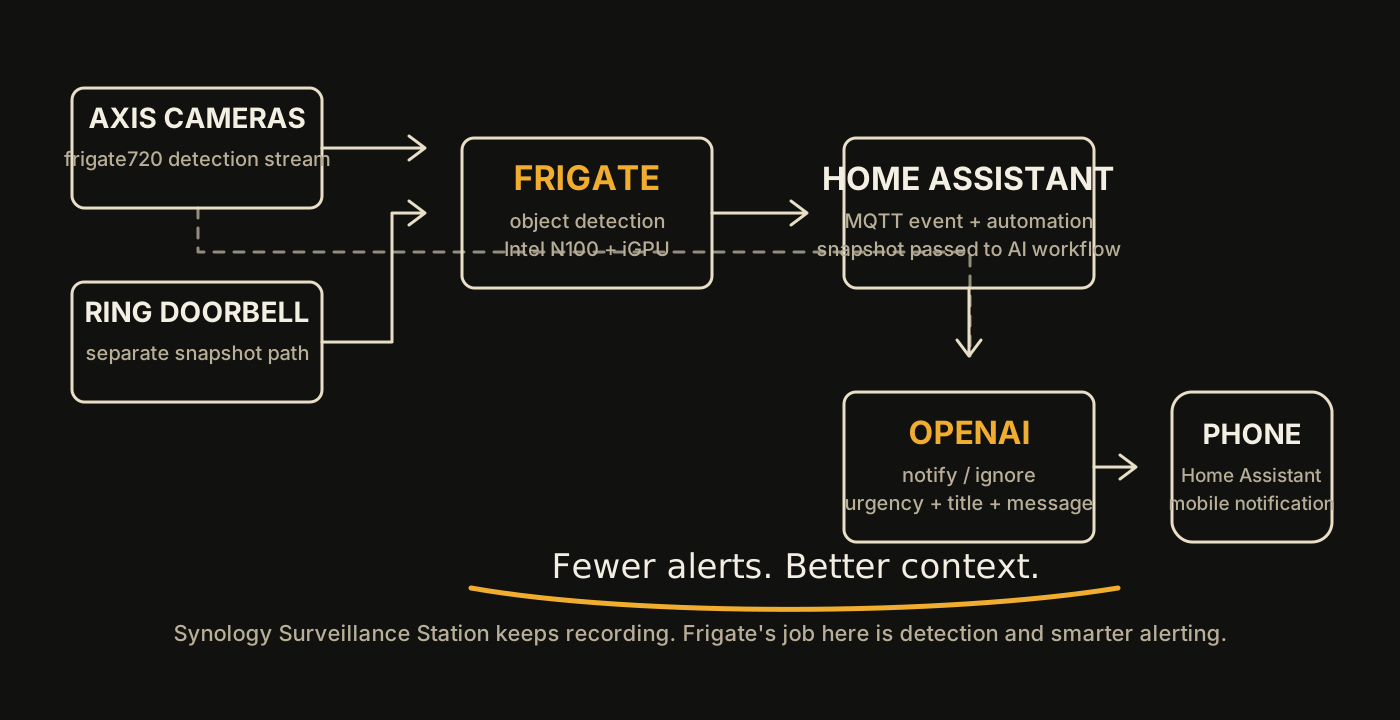
Normal camera path
Most of the cameras feed Frigate a lower-resolution detection stream. Frigate detects the object, the event reaches Home Assistant through MQTT, and the automation passes the event snapshot into the AI notification workflow.
Ring needed its own path
The front door Ring camera behaves differently from my normal Frigate cameras, so the workflow handles its snapshot source separately. That turned out to matter later when I started troubleshooting stale and mismatched notification images.
I tried Frigate in my virtual environment first. For my setup, that was the wrong place.
My first Frigate attempt lived in the Proxmox environment. The result was high CPU utilization and a system that felt much heavier than an object-detection service should have felt.
I moved Frigate to a physical Intel N100 mini PC with 12 GB of LPDDR5, a 256 GB SSD and Intel iGPU acceleration available at/dev/dri/renderD128. Docker lives under /opt/frigate, with go2rtc enabled for the stream side of the build.
This is not a universal rule that Frigate should never be virtualized. It is the result from my hardware, my camera count and the way I wanted the environment to behave. For this build, the small physical host was the cleaner answer.
The model does not control the cameras. It returns a structured notification decision.
The Home Assistant-side Python workflow submits the event image for analysis and expects a small structured response. A sanitized result from my testing looked like this:
{
  "notify": true,
  "urgency": "normal",
  "confidence": 1.0,
  "title": "Person Approaching Front Door",
  "message": "A person is walking towards the front door on the walkway."
}
The important field is the first one. The workflow can decide not to notify at all. When it does notify, the title and message are written around what is actually happening in the image instead of just repeating person detected.
The preview was right. The image I opened was wrong.
This was the kind of bug that makes an otherwise working project feel broken.
Home Assistant could show the correct preview image in the notification, but tapping the notification could open a different or stale image. At one point, the opened image was from a previous test event.
Preview looks correct.
Opened image is wrong.
Current image versus event-specific image becomes the real problem.
I also noticed a separate timestamp issue on non-Ring snapshots. That one was not Home Assistant changing the time. The timestamp was already burned into the source image.
The detection pipeline could work perfectly and the project still felt unreliable if the image attached to the alert was wrong.
The goal was never to make the notification system more impressive. It was to make it less annoying.
Frigate still does the detection. Synology still does the recording. Home Assistant still owns the automation and mobile notification side. The AI layer sits in the middle and adds context before I get interrupted.
I would design event-specific image handling before building the notification polish.
The biggest lesson from the stale-image troubleshooting is that a notification image needs to belong to an event. A genericlatest.jpg-style path is convenient during testing, but it creates room for caching, overwrites and mismatches when several events or test runs happen close together.
I would also keep the Ring path explicitly separate from the normal Frigate event path from the beginning instead of trying to make every camera source behave as though it exposes snapshots in the same way.
Keep the image.
Then notify.